three.js
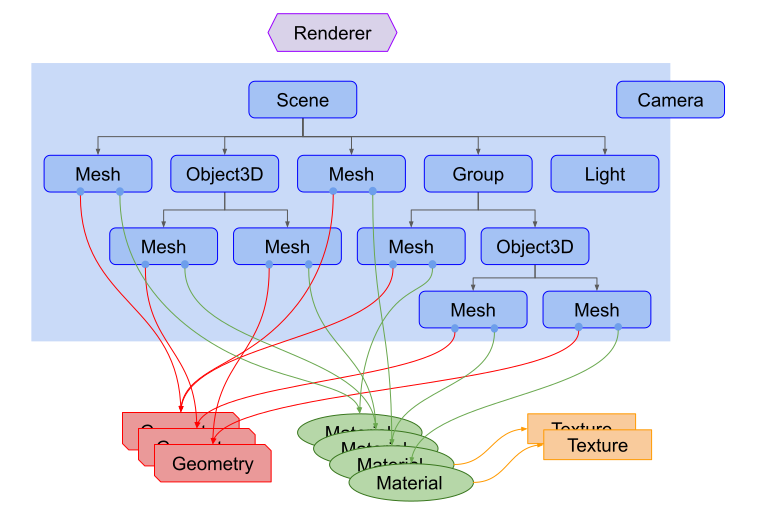
A cross-browser JS library and API to create and display 3D graphics using WebGL.
basic usage
index.html
DOCTYPE
<html>
<head>
<meta charset="utf-8">
<title>My first three.js app</title>
<style>
body { margin: 0; }
</style>
</head>
<body>
<!-- use a CDN -->
<script src="https://cdn.bootcdn.net/ajax/libs/three.js/r128/three.js"></script>
<script src="source.js"></script>
</body>
</html>htmlsource.js
// create renderer
const renderer = new THREE.WebGLRenderer();
renderer.setSize( window.innerWidth, window.innerHeight );
document.body.appendChild( renderer.domElement );

// create camera
const camera = new THREE.PerspectiveCamera( 45, window.innerWidth / window.innerHeight, 1, 500 );
camera.position.set( 0, 0, 100 );
camera.lookAt( 0, 0, 0 );

// create scene
const scene = new THREE.Scene();

// draw some lines
const material = new THREE.LineBasicMaterial( { color: 0x0000ff } );
const points = [];
points.push( new THREE.Vector3( - 10, 0, 0 ) );
points.push( new THREE.Vector3( 0, 10, 0 ) );
points.push( new THREE.Vector3( 10, 0, 0 ) );
const geometry = new THREE.BufferGeometry().setFromPoints( points );
const line = new THREE.Line( geometry, material );

// add to scene
scene.add( line );
// render the scene from camera
renderer.render( scene, camera );javascript
// another example
//import * as THREE from 'js/three.module.js';
var camera, scene, renderer;
var geometry, material, mesh;
init();
animate();
function init() {
camera = new THREE.PerspectiveCamera( 70, window.innerWidth / window.innerHeight, 0.01, 10 );
camera.position.z = 1;
scene = new THREE.Scene();
geometry = new THREE.BoxGeometry( 0.2, 0.2, 0.2 );
material = new THREE.MeshNormalMaterial();
mesh = new THREE.Mesh( geometry, material );
scene.add( mesh );
renderer = new THREE.WebGLRenderer( { antialias: true } );
renderer.setSize( window.innerWidth, window.innerHeight );
document.body.appendChild( renderer.domElement );
}
function animate() {
requestAnimationFrame( animate );
mesh.rotation.x += 0.01;
mesh.rotation.y += 0.02;
renderer.render( scene, camera );
}
// we can also get time for animation
function animate2(time) {
requestAnimationFrame( animate );
time *= 0.001 // milisecond --> second
mesh.rotation.x = time;
mesh.rotation.y = time;
renderer.render( scene, camera );
}javascriptapp structure